
Roof carrier
Important safety notes
 WARNING
Only use roof racks approved by Mercedes-
Benz for your vehicle model to avoid damage
to the vehicle.
Follow the manufacturer's installation instructions. Otherwise, an improperly attached roof rack system or its load could become detached from the vehicle.
Do not exceed the maximum roof load of 220 lb (100 kg).
Take into consideration that when the roof rack is loaded, the handling characteristics are different from those when operating the vehicle without the roof rack loaded.
! Mercedes-Benz recommends that you only use roof carriers that have been tested and approved for Mercedes-Benz vehicles.
This helps to prevent damage to the vehicle.
Position the load on the roof carrier in such a way that the vehicle will not sustain damage even when it is in motion.
Ensure that when the roof carrier is installed:
- you can raise the sliding sunroof or the
panorama roof with power tilt/sliding
panel fully (depending on the vehicle's
equipment)
- you can open the tailgate or trunk lid fully
- the roof carrier does not come into
contact with the antenna
! To avoid damaging or scratching the covers, do not use metallic or hard objects to open them.
Attaching the roof carrier (Sedan)
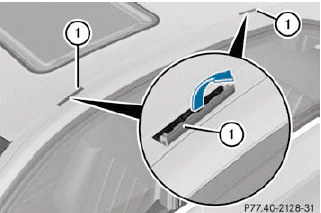
Vehicles with a steel roof or sliding sunroof (illustration)
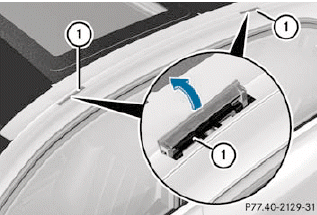
Vehicles with a panorama roof with power tilt/ sliding panel
•► Open covers 1 carefully in the direction of the arrow.
•► Fold covers 1 upwards.
•► Only secure the roof carrier to the anchorage points under covers 1.
•► Observe the manufacturer's installation instructions.
Attaching the roof carrier (Wagon)
•► Secure the roof carrier to the roof rails.
•► Observe the manufacturer's installation instructions.
See also:
Setting DSR
With the DSR speed function, you can set the
speed of DSR (the speed for driving downhill) to a value between 3 mph (Canada: 4 km/h) and 10 mph (Canada:
18 km/h). The adjustments are made in
1-mp ...
Playback options
The following options are available to you:
• Normal Track Sequence
The tracks are played in the normal order
(e.g. track 1, 2, 3, etc.).
In MP3 mode, the track order is determined
by the ord ...
Standard display
– Press and hold the button on
the
steering wheel until the Trip menu with
odometer 1 and trip odometer 2 is
shown. ...