
Standard display
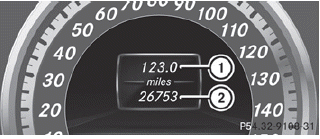
•► Press and hold the  button on
the
steering wheel until the Trip menu with
odometer 1 and trip odometer 2 is
shown.
See also:
Adding DEF
WARNING
Make sure
- DEF does not come into contact with skin, eyes, or clothing
- to keep DEF out of the reach of children
If you and/or others have come into contact with DEF:
- If DEF has gott ...
Tires
Problem
Possible causes/consequences and •► Solutions
USA only:
The yellow tire pressure
monitor warning lamp
(pressure loss/
malfunction) is lit.
Canada only:
The yell ...
Warning and display messages in the
multifunction display
– Activate ATTENTION ASSIST using the onboard
computer (Y page 232).
Symbol 1 appears in the multifunction
display.
– If necessary, take a break.
– Press or
to confirm the
message.
On l ...