
Warning displays
The warning displays show the distance between the sensors and the obstacle. The warning display for the front area is located on the dashboard above the center air vents.
The warning display for the rear area is located on the headliner in the rear compartment.
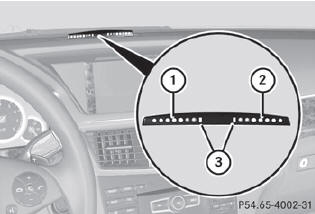
Warning display for the front area
1. Segments on the left-hand side of the
vehicle
2. Segments on the right-hand side of the
vehicle
3. Segments showing operational readiness
The warning display for each side of the vehicle is divided into five yellow and two red segments. PARKTRONIC is operational if yellow segments showing operational readiness 3 light up.
The selected transmission position determines which warning display is active when the engine is running.

One or more segments light up as the vehicle approaches an obstacle, depending on the vehicle's distance from the obstacle.
From the:
- sixth segment onwards, you will hear an intermittent warning tone for approximately two seconds.
- seventh segment onwards, you will hear a warning tone for approximately two seconds. This indicates that you have now reached the minimum distance.
See also:
Important safety notes
See the "Important safety notes" section ().
If ESP® detects that the vehicle is deviating from the direction desired by the
driver, one or more wheels are braked to stabilize the vehi ...
Upshifting
Vehicles with the dynamic
handling
package: if the maximum engine speed for
the shift range is reached and you continue
to accelerate, the automatic transmission
shifts up, except when manu ...
Panic alarm
► To activate: press
button 1 for at
least one second.
An alarm sounds and the exterior lighting
flashes.
► To deactivate: press
button 1 again.
or
► Insert the SmartKe ...