
Cruise control lever
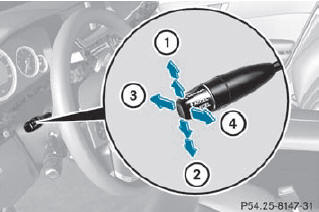
1. To switch on or to increase the speed
2. To switch on or to reduce the speed
3. To deactivate cruise control
4. To switch on with the current speed or
with the last stored speed
When you activate cruise control, the stored speed is shown in the multifunction display for five seconds. In the multifunction display, the segments between the stored speed and the maximum speed light up.
See also:
Selecting a video DVD
Press the COMAND controller to
show
the menu.
Select Media by sliding and
turning
the COMAND controller and press
to confirm.
The media list appears. The dot
indicates the current ...
Underinflated tires
WARNING
Follow recommended tire inflation pressures.
Do not underinflate tires. Underinflated tires
wear excessively and/or unevenly, adversely
affect handling and fuel economy, and are
more ...
Braking
If ABS intervenes when braking, you will feel
a pulsing in the brake pedal.
- If ABS intervenes: continue to depress the
brake pedal with force until the braking
situation is over.
- To make a ...