
Transmission position and drive program display
The current transmission position and drive program appear in the multifunction display.
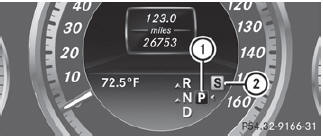
1. Transmission position display
2. Drive program display
The arrows in the transmission position display show how and into which transmission positions you can change using the DIRECT SELECT lever.
If the transmission position display in the multifunction display is not working, you should pull away carefully to check whether the desired transmission position is engaged. Ideally, you should select transmission position D and drive program E or S. Do not restrict the shift range.
See also:
Trip computer "From start" or "From reset"
The values in the From Start submenu are
calculated from the start of a journey, while
the values in the From Reset submenu are
calculated from the last time the submenu
was reset.
Press the ...
Driving with DISTRONIC PLUS
Pulling away
– If the vehicle in front pulls away: remove
your foot from the brake pedal.
– Briefly pull the cruise control lever
towards you.
or
– Accelerate briefly.
Your vehicle pulls away ...
Rejecting or ending a call
Press the button on the steering
wheel.
If you are not in the Tel menu, you can still reject or end a call. ...