
Opening and closing the side windows
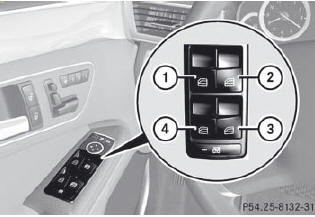
1. Front left
2. Front right
3. Rear right
4. Rear left
The switches for all side windows are located on the driver's door. There is also a switch on each door for the corresponding side window.
The switches on the driver's door take precedence.
i The side windows cannot be operated from the rear when the override feature for the side windows is activated.
•► Turn the SmartKey to position 1 or 2 in the ignition lock.
•► To open: press the corresponding switch.
•► To close: pull the corresponding switch.
If you press the switch beyond the point of resistance, an automatic opening/ closing process is started in the corresponding direction. You can stop automatic operation by operating the switch again.
You can continue to operate the side windows after you switch off the engine or remove the SmartKey. This function is available for up to five minutes or until the driver's or front-passenger door is opened.
See also:
Front-end structure: crumple zone on four levels
Compared to the previous model series, the Mercedes engineers have further
enlarged the deformation zones substantially in the front and rear sections of
the new CLS, as well as improving the ener ...
Hiding display messages
You can hide some display messages with a low priority.
•► Press the or
button on the steering wheel to
hide the display message.
The display message is cleared.
Display messages with a ...
Operating video DVD
Switch on COMAND and select Video DVD.
Press the or
button on the
steering wheel to select the Audio menu.
1 Current scene
2 Medium (disc number only for DVD
changer)
To select the n ...