
Removing the mechanical key
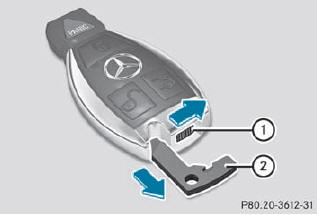
•► Push release catch 1 in the direction of the arrow and at the same time, remove mechanical key 2 from the SmartKey.
See also:
Cleaning the headliner and carpets
► Roof lining: use soft brushes or dry
shampoo if it is particularly dirty.
► Carpets: use carpet and textile cleaners
that have been approved and
recommended by Mercedes-Benz. ...
Important safety notes
For reasons of safety, Mercedes-Benz recommends that you drive with the lights
switched on even during the daytime. In some countries, operation of the headlamps
varies due to legal requirements a ...
Front-end structure: crumple zone on four levels
Compared to the previous model series, the Mercedes engineers have further
enlarged the deformation zones substantially in the front and rear sections of
the new CLS, as well as improving the ener ...