
Panic alarm
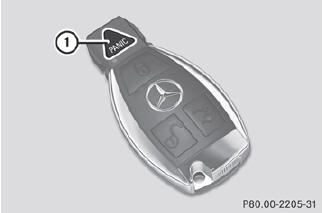
•► To activate: press  button 1 for at
least one second.
button 1 for at
least one second.
An alarm sounds and the exterior lighting flashes.
•► To deactivate: press  button 1
again.
button 1
again.
or
•► Insert the SmartKey into the ignition lock.
or
•► Press the KEYLESS-GO Start/Stop button.
The KEYLESS-GO key must be in the
vehicle.
USA only:
This device complies with Part 15 of the
FCC Rules. Operation is subject to the
following two conditions:
1. This device may not cause harmful interference, and 2. this device must accept any interference received, including interference that may cause undesired operation.
Any unauthorized modification to this device could void the user's authority to operate the equipment.
The product label with FCC ID and IC certification number can be found in the battery case of the SmartKey.
Canada only:
This device complies with RSS-Gen of
Industry Canada. Operation is subject to
the following two conditions:
1. This device may not cause interference, and 2. this device must accept any interference received, including interference that may cause undesired operation.
Any unauthorized modification to this device could void the user's authority to operate the equipment.
The product label with FCC ID and IC certification number can be found in the battery case of the SmartKey.
See also:
Important safety notes
WARNING
When leaving the vehicle, always remove the
SmartKey from the ignition lock. Always take
the SmartKey with you and lock the vehicle.
Do not leave children unattended in the
ve ...
Important safety notes
The rear view camera is an optical parking aid.
It shows the area behind your vehicle in the
COMAND display.
WARNING
Make sure that no persons or animals are in
the maneuvering range. Other ...
Vehicle identification plate
Even if you have calculated the total load carefully, you should still make sure
that the gross vehicle weight rating and the gross axle weight rating are not exceeded.
Details can be found on the ...