
Resetting triggered NECK-PRO head restraints
 WARNING
For safety reasons, have the NECK-PRO head
restraints checked at an authorized
Mercedes-Benz Center after a rear-end
collision.
WARNING
When pushing back the NECK-PRO head
restraint cushion, make sure your fingers do
not become caught between the head
restraint cushion and the cover. Failure to
observe this could result in injuries.
Resetting the NECK-PRO head restraints requires a lot of strength. If you have difficulty resetting the NECK-PRO head restraints, have this work carried out at a qualified specialist workshop, e.g. an authorized Mercedes-Benz Center.
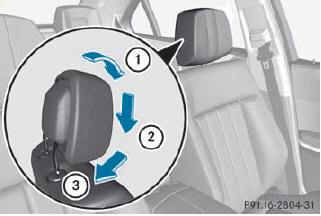
Example: Sedan
- Tilt the top of the NECK-PRO head restraint
cushion forwards in the direction of
arrow 1.
- Push the NECK-PRO head restraint cushion
down in the direction of arrow 2 as far as
it will go.
- Firmly push the NECK-PRO head restraint
cushion back in the direction of arrow 3
until the cushion engages.
- Repeat this procedure for the second
NECK-PRO head restraint.
See also:
Multifunction display
Values and settings as well as display
messages are shown in the multifunction
display.
1 Menu bar
2 Description field ...
Position of the steering wheel when the EASY-ENTRY/EXIT feature is active
The steering wheel swings upwards when you:
remove the SmartKey from the ignition lock
open the driver's door and KEYLESS-GO is in position 1
open the driver's door and the SmartKey is ...
Starting procedure with the SmartKey
To start the engine using the SmartKey instead of KEYLESS-GO, pull the Start/
Stop button out of the ignition lock.
X Turn the SmartKey to position 3 in the ignition lock () and release
it as ...