
DOT, Tire Identification Number (TIN)
U.S. tire regulations prescribe that every manufacturer of new tires or retreader has to imprint a TIN in or on the sidewall of each tire produced.
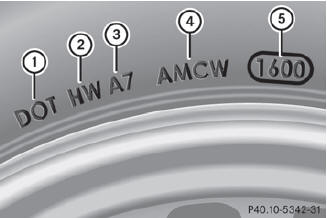
The TIN is a unique identification number. The TIN enables the tire manufacturers to inform purchasers of recalls and other safetyrelevant matters. It makes it possible for the purchaser to easily identify the affected tires.
The TIN is made up of manufacturer identification code 2, tire size 3, tire type code 4 and manufacturing date 5.
 Tire data is vehicle-specific
and may
deviate from the data in the example.
Tire data is vehicle-specific
and may
deviate from the data in the example.
DOT (Department of Transportation): tire symbol 1 indicates that the tire complies with the requirements of the U.S. Department of Transportation.
Manufacturer identification code: manufacturer identification code 2 provides details on the tire manufacturer. New tires have a code with two symbols. Retreaded tires have a code with four symbols.
Further information about retreaded tires.
Tire size: identifier 3 describes the tire size.
Tire type code: tire type code 4 can be used by the manufacturer as a code to describe specific characteristics of the tire.
Date of manufacture: date of manufacture
5 provides information about the age of a
tire. The first and second positions represent
the week of manufacture, starting with "01"
for the first calendar week. Positions three
and four represent the year of manufacture.
For example, a tire that is marked with
"3208", was manufactured in week 32 in
2008.
See also:
Turn signals
1. High-beam headlamps
2. Right turn signal
3. High-beam flasher
4. Left turn signal
•► To indicate briefly: press the combination
switch briefly to the pressure point in the
...
Tire size designation, load-bearing capacity and speed rating
1 Tire width
2 Nominal aspect ratio in %
3 Tire code
4 Rim diameter
5 Load bearing index
6 Speed rating
Tire data is vehicle-specific
and may
deviate from the data in the example.
Genera ...
Important safety notes
WARNING
Gasoline and diesel fuels are highly flammable
and poisonous. They burn violently and can
cause serious injury.
Never allow sparks, flames or smoking
materials near gasoline or die ...