
Introduction
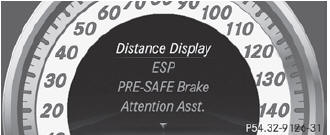
In the DriveAssist. menu you can:
• show the distance display
• activate/deactivate ESP®
• activate/deactivate PRE-SAFE® Brake
• activate/deactivate ATTENTION ASSIST
• activate/deactivate Blind Spot Assist or Active Blind Spot Assist
• activate/deactivate Lane Keeping Assist or Active Lane Keeping Assist
See also:
Call priority
When service calls are active, e.g. Roadside
Assistance or MB Info calls, an emergency
call can still be initiated. In this case, an
emergency call will take priority and override
all other ac ...
The mbrace system
The mbrace system provides different services, e.g.:
automatic and manual emergency call
Roadside Assistance call
MB Info call
To adjust the volume during an mbrace call, proceed as follows ...
Switching on/off
WARNING
Repeatedly setting the seat heating to level
3 may result in excessive seat temperatures.
The health of passengers that have limited
temperature sensitivity or a limited ability to
r ...