
Standard display
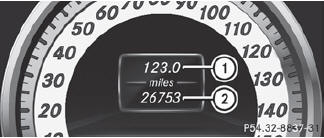
 Press and hold the
 button on the
steering wheel until the Trip menu with
odometer 1 and trip odometer 2 is
shown.
button on the
steering wheel until the Trip menu with
odometer 1 and trip odometer 2 is
shown.
See also:
General notes
USA only:
This device complies with Part 15 of the
FCC Rules. Operation is subject to the
following two conditions:
1. This device may not cause harmful
interference, and
2. this device must ...
RACETIMER
Displaying and starting RACETIMER
WARNING
The RACETIMER feature is only for use on
roads and in conditions where high speed
driving is permitted. Racing on public roads is
prohibited under ...