
Menu overview
The number of menus shown depends on the optional equipment in the vehicle.
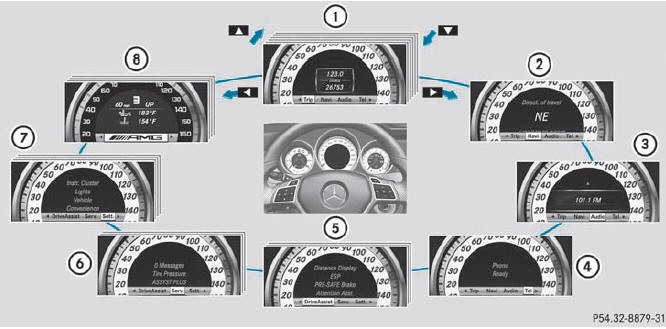
Function
1 Trip menu
2 Navi menu (navigation details)
3 Audio menu
4 Tel menu (telephone)
5 DriveAssist menu (assistance)
6 Serv. menu
• calls up display messages
• tire pressure loss warning system (Canada only)
• tire pressure monitor
• ASSYST PLUS service interval display
7 Sett. menu
8 AMG menu in AMG vehicles
The Audio and Tel menus differ slightly in vehicles with an audio system and vehicles with COMAND. The examples given in this Operator's Manual apply to vehicles equipped with COMAND.
See also:
Copying music data to the MUSIC
REGISTER
Introduction
You can copy music files from discs in the
DVD changer, the single DVD drive, the
memory card or the COMAND USB, as long
as they are in MP3 and/or WMA formats.
While copying, sev ...
SRS warning lamp
SRS functions are checked regularly when
you switch on the ignition and when the
engine is running. Therefore, malfunctions
can be detected in good time.
The SRS warning lamp in the
instrume ...
Activating/deactivating ATTENTION ASSIST
Press the
or
button on the
steering wheel to select the DriveAssist
menu.
Press the
or
button to select
Attention Asst..
Press
.
The current selection is displayed.
To activate/ ...