
Overview
The on-board computer is activated as soon as you turn the SmartKey to position 1 in the ignition lock.
You can control the multifunction display and the settings in the on-board computer using the buttons on the multifunction steering wheel.
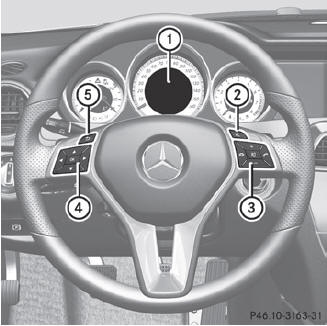
1 Multifunction display
2 To switch on the Voice Control System; see the separate operating
instructions
3 Right control panel
4 Left control panel
5 Back button
See also:
Increased vehicle weight due to optional equipment
This is the combined weight of all standard
and optional equipment available for the
vehicle, regardless of whether it is actually
installed on the vehicle or not. ...
Adaptive Highbeam Assist
You can use this function to set the
headlamps to change between low beam and
high beam automatically. The system
recognizes vehicles with their lights on, either
approaching from the opposite ...
Rear fog lamp
•► To switch on the rear fog lamp: turn the
SmartKey in the ignition lock to position 2
or start the engine.
•► Turn the light switch to
or or
.
If the light switch is set to ...