
Warning and display messages in the multifunction display
 Activate ATTENTION ASSIST using
the onboard
computer.
Activate ATTENTION ASSIST using
the onboard
computer.
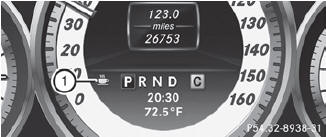
Symbol 1 appears in the multifunction
display.
If ATTENTION ASSIST is active, you will be warned no sooner than 20 minutes after your journey has begun. You will then hear an intermittent warning tone twice, and the Attention Assist: Drowsiness Detected message appears in the multifunction display.
If necessary, take a break.
Press
 to confirm the message.
On long journeys, take regular breaks in good time to allow yourself to rest properly. If you do not take a break and ATTENTION ASSIST still detects typical indicators of fatigue or increasing lapses in concentration, you will be warned again after 15 minutes at the earliest.
ATTENTION ASSIST is reset when you
continue your journey and starts assessing
your tiredness again if:
• you switch off the engine.
• you take off your seat belt and open the
driver's door, e.g. for a change of drivers or
to take a break.
See also:
Setting climate control to automatic
WARNING
If you switch off the cooling function, the vehicle will not be cooled when weather
conditions are warm. The windows can fog up more quickly. Window fogging may impair
visibility and ...
Kilopascal (kPa)
Metric unit for tire pressure. 6.9 kPa is the
equivalent of 1 psi. Another unit for tire
pressure is bar. There are 100 kilopascals
(kPa) to 1 bar. ...
Design: a muscular, self-assured presence
The modified design reflects the effortless superiority and power of the
Mercedes-Benz S-Class Saloon. It is characterised by the more pronounced
arrow-shape of the radiator grille, plus a new fro ...