
Deactivating/activating PARKTRONIC
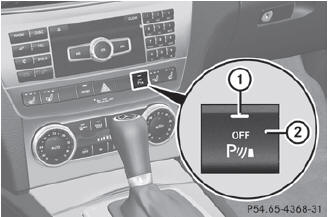
Deactivating/activating PARKTRONIC
1 Indicator lamp
2 To deactivate/activate PARKTRONIC
If indicator lamp 1 lights up, PARKTRONIC is deactivated. Parking Guidance is also deactivated.
 PARKTRONIC is automatically
activated
when you turn the SmartKey to position 2
in the ignition lock.
PARKTRONIC is automatically
activated
when you turn the SmartKey to position 2
in the ignition lock.
See also:
Seat belt
Display messages
Possible causes/consequences and Solutions
After starting
the engine, the red seat belt warning lamp lights up for six seconds.
The seat belt warning lam ...
Important safety notes
WARNING
When expanding the cargo volume, always
fully fold the corresponding seats and, if so
equipped, always use the cargo net when
transporting cargo.
Unless you are transporting cargo, th ...
Setting the B-pillar air vents
1 B-pillar air vent
2 Thumbwheel for B-pillar air vent
To open/close: turn thumbwheel 2 to the
left or right. ...