
DISTRONIC PLUS displays in the speedometer
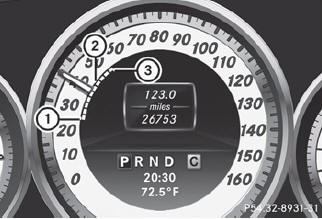
When DISTRONIC PLUS is activated, one or two segments 2 in the set speed range light up.
 For design reasons, the speed
displayed
in the speedometer may differ slightly from
the speed set for DISTRONIC PLUS.
For design reasons, the speed
displayed
in the speedometer may differ slightly from
the speed set for DISTRONIC PLUS.
If DISTRONIC PLUS detects a vehicle in front, segments 2 between speed of the vehicle in front 1 and stored speed 3 light up.
See also:
Important safety notes
Your vehicle may be equipped with a sliding
sunroof or a panorama roof with power tilt/
sliding panel. In the following section, the
term "sliding sunroof" refers to both types of
sl ...
Important safety notes
WARNING
If you tow the vehicle, you must use a rigid
towing bar if:
- the engine is not running.
- there is a brake system malfunction.
- there is a malfunction in ...
Cordless headphones for the front passenger
There are different cordless headphones for
the front passenger and the rear
compartment.
The cordless headphones for the front
passenger can be identified by SPLITVIEW
symbol 1 on the head ...