
General information
The program selector button allows you to choose between different driving characteristics.
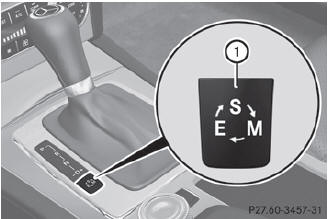
Example: program selector button
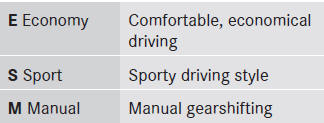
 For further information on the
automatic
drive program.
For further information on the
automatic
drive program.
Only change from automatic drive program E or S to manual drive program M when the vehicle is stationary.
 Press program selector button 1
repeatedly until the letter for the desired
gearshift program appears in the
multifunction display.
Press program selector button 1
repeatedly until the letter for the desired
gearshift program appears in the
multifunction display.
When the engine is started, the
automatic
transmission always switches to automatic
drive program E (drive program C in AMG
vehicles).
See also:
Fuse box in the cargo compartment
•► Open the tailgate.
•► To open: pull handle 1.
•► Open the cover downwards.
•► Fold trim 2 forwards. ...
Switching the ZONE function on/off
- To switch on: press the
button.
The indicator lamp in the button
lights
up.
Dual-zone automatic climate control: the
temperature setting for the driver's side is
not adopted for the fr ...
Notes on driving
- If the vehicle is heavily laden, check the tire
pressures and correct them if necessary.
- When parking your vehicle, make sure that
the tires do not get deformed by the curb
or o ...