
Switching the windshield wipers on/off
WARNING
Wiper blades are components that are subject
to wear and tear. Replace the wiper blades
twice a year, preferably in the spring and fall.
Otherwise the windshield will not be wiped
properly. As a result, you may not be able to
observe surrounding traffic conditions and
could cause an accident.
 Do not operate the windshield
wipers
when the windshield is dry, as this could
damage the wiper blades. Moreover, dust
that has collected on the windshield can
scratch the glass if wiping takes place when
the windshield is dry.
Do not operate the windshield
wipers
when the windshield is dry, as this could
damage the wiper blades. Moreover, dust
that has collected on the windshield can
scratch the glass if wiping takes place when
the windshield is dry.
If the windshield wipers leave
smears on
the windshield after the vehicle has been
washed in an automatic car wash, wax or
other residues may be the reason for this.
Clean the windshield using washer fluid
after washing the vehicle in an automatic
car wash.
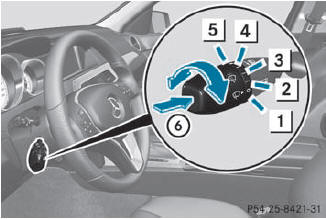
Combination switch
1  Windshield wipers off
2  Intermittent wipe, low
3  Intermittent wipe, high
4  Continuous wipe, slow
5  Continuous wipe, fast
6  Single
wipe/
Single
wipe/  To wipe the windshield using
washer fluid
To wipe the windshield using
washer fluid
 Switch on the ignition.
Turn the combination switch to the
corresponding position.
Intermittent wiping with rain
sensor: due
to optical influences and the windshield
becoming dirty in dry weather conditions,
the windshield wipers may be activated
inadvertently. This could then damage the
windshield wiper blades or scratch the
windshield.
For this reason, you should always switch
off the windshield wipers in dry weather.
In the or
position, the appropriate
wiping frequency is set automatically
according to the intensity of the rain. In
the position, the rain sensor is
more
sensitive than in the position,
causing
the windshield wipers to wipe more
frequently.
See also:
Controlled compression and rebound: the multi-link independent suspension
The series-production launch of the Mercedes-Benz 190 in 1983 also marked the
beginning of the multi-link independent suspension's career. In many respects
this is a feature that remains without p ...
Indicator and warning display
1 Yellow indicator lamp/red warning lamp
When Blind Spot Assist is activated, indicator
lamp 1 lights up yellow in the exterior
mirrors up to a vehicle speed of 20 mph
(30 km/h). When the vehicl ...
Premium-grade unleaded gasoline
To ensure the longevity and full
performance of the engine, only premiumgrade
unleaded gasoline may be used.
If there is no premium-grade unleaded
gasoline available and regular-grade
unlead ...