
Opening and closing the side windows
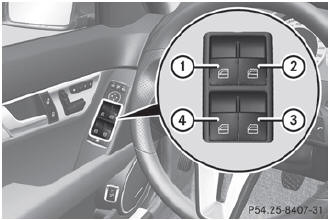
Opening and closing the side windows
1 Front left
2 Front right
3 Rear right
4 Rear left
The switches for all side windows are located on the driver's door. There is also a switch on each door for the corresponding side window.
The switches on the driver's door take precedence.
 The side windows cannot be
operated
from the rear when the override feature for
the side windows is activated.
The side windows cannot be
operated
from the rear when the override feature for
the side windows is activated.
 Turn the SmartKey to position 1
or 2 in the ignition lock.
Turn the SmartKey to position 1
or 2 in the ignition lock.
To open: press the
corresponding switch.
To close: pull the
corresponding switch.
If you press the switch beyond
the point
of resistance, an automatic opening/closing process is started in the
corresponding direction. You can stop
automatic operation by operating the
switch again.
You can continue to operate the
side
windows after you switch off the engine or
remove the SmartKey. This function is
available for up to five minutes or until the
driver's or front-passenger door is opened.
See also:
Useful information
This Operator's Manual describes all models and all standard and optional equipment
of your vehicle available at the time of publication of the Operator's Manual. Country-specific
diffe ...
Genuine Mercedes-Benz parts
All Mercedes-Benz Centers maintain a supply
of genuine Mercedes-Benz parts for
necessary service and repair work. In
addition, strategically located parts delivery
centers provide for quick and re ...
System self-test
After you have switched on the ignition, the
system carries out a self-diagnosis.
WARNING
A malfunction in the system has been
detected if one of the following conditions
occurs:
• the indi ...