
Checking the battery
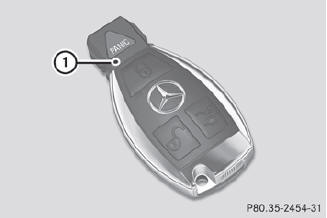
Checking the battery
 Press the
 or
or
 button. The battery is working
properly if battery
check lamp 1 lights up briefly
button. The battery is working
properly if battery
check lamp 1 lights up briefly
If battery check lamp 1 does not light up briefly during the test, the battery is discharged.
Changing the battery.
 You can obtain the battery at a
qualified
specialist workshop.
You can obtain the battery at a
qualified
specialist workshop.
If the SmartKey battery is
checked within
the signal reception range of the vehicle,
pressing the or
button locks or
unlocks the vehicle.
See also:
Adjusting the head restraint height(second and third row of seats)
Outer seat head restraints in the second row of
seats
Outer seat head restraints in the third row of seats
► If the head restraint is fully lowered,
it is
necessary to press release ...
Please bear the following in mind
Resetting the service interval display A qualified specialist workshop, e.g.
an authorized Mercedes-Benz Center, will reset the service interval display after
the necessary service work has been c ...
Adjusting the volume
Adjusting the volume for the audio or
video source
Adjusting the volume for the audio or video source
To adjust: turn thumbwheel 1.
or
Press the or
button on the
multifunction steer ...