
Displaying the range and current fuel consumption
– Press the  or
or
 button on the
steering wheel to select the Trip menu.
button on the
steering wheel to select the Trip menu.
– Press the  or
or
 button to select
current fuel consumption and approximate
range.
button to select
current fuel consumption and approximate
range.
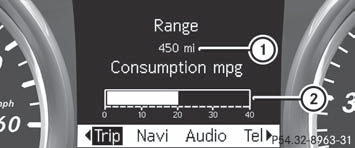
1 Approximate range
2 Current fuel consumption
Approximate range 1 is calculated
according to current driving style and the
amount of fuel in the tank. If there is only a
small amount of fuel left in the fuel tank, the
display shows a vehicle being refueled
 instead of range 1.
See also:
Problems with the transmission
Problem
Possible causes/consequences and
Solutions
The transmission has problems shifting gear.
The transmission is losing oil.
- Have the transmission checked at a qualif ...
Notes on regularly inspecting wheels
and tires
WARNING
Regularly check the tires for damage.
Damaged tires can cause tire inflation
pressure loss. As a result, you could lose
control of your vehicle.
Worn, old tires can cause accidents. If ...
Problems with the SmartKey
Problem
You cannot lock or unlock the vehicle using the SmartKey.
Possible causes/consequences and Solutions
The SmartKey battery is discharged or nearly discharged.
Try again to lock/unlock th ...