
Locking and unlocking centrally
The SmartKey centrally locks/unlocks:
• the doors
• the trunk lid
• the fuel filler flap
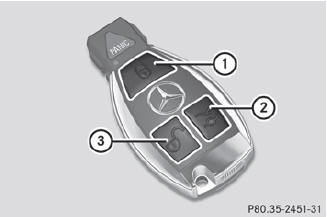
1  Locks the vehicle
2  Unlocks the trunk lid
3  Unlocks the vehicle
When unlocking, the turn signals flash once.
When locking, they flash three times.
When it is dark, the surround lighting also comes on if it is activated in the on-board computer.
If you activate the acoustic locking
confirmation function, you will hear the
following, depending on the date of
production of the vehicle:
• an acoustic signal when locking
or
• one acoustic signal when unlocking and three when locking.
The audible signal can be activated and deactivated using the on-board computer.
 To unlock centrally:
press the
button.
To unlock centrally:
press the
button.
If you do not open the vehicle within approximately 40 seconds of
unlocking:
• the vehicle is locked again.
• the theft deterrent locking system is armed again.
To lock centrally: press
the button.
See also:
Downloading destinations in COMAND
Information on the components and operating principles of COMAND can be found
in the separate COMAND operating instructions.
You can only use the Destination Download function if the vehicle ...
Active light function
The active light function is a system that moves the headlamps according to the
steering movements of the front wheels. In this way, relevant areas remain illuminated
while driving. This allows ...
Hill start assist
Hill start assist helps you when pulling away
forwards or in reverse on an uphill gradient.
It holds the vehicle for a short time after you
have removed your foot from the brake pedal.
This gi ...