
Setting a speed
 WARNING
Keep in mind that it may take a brief moment
until the vehicle has made the necessary
adjustments.
Increase or decrease the set vehicle speed to
a value that the prevailing road conditions and
legal speed limits permit. Otherwise, sudden
and unexpected acceleration or deceleration
of the vehicle could cause an accident and/or serious injury to you and others.
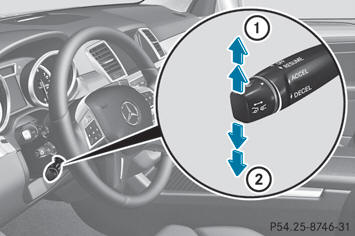
– Press the cruise control lever up 2 for a
higher speed or down 3 for a lower speed.
– Keep the cruise control lever pressed until
the desired speed is reached.
– Release the cruise control lever.
The new speed is stored. DISTRONIC PLUS
is activated and adjusts the vehicle's speed
to the new speed stored.
– Making adjustments in 1 mph
increments (1 km/h increments): briefly
press the cruise control lever to the
pressure point.
The last stored speed increases or
decreases in 1 mph increments (in Canada:
1 km/h increments).
– Making adjustments in 5 mph
increments (10 km/h increments):
briefly press the cruise control lever
beyond the pressure point.
The last stored speed increases or
decreases in 5 mph increments (10 km/h
increments).
See also:
Load index
Tire data is vehicle-specific and may deviate from the data in the example.
In addition to the load bearing index, load index 1 may be imprinted after the
letters that identify speed index 6 ( ...
Premium-grade unleaded gasoline
To ensure the longevity and full
performance of the engine, only premiumgrade
unleaded gasoline may be used.
If there is no premium-grade unleaded
gasoline available and regular-grade
unleade ...
Important safety notes
WARNING
When operating the climate control, the air
that enters the passenger compartment
through the air vents can be very hot or very
cold (depending on the set temperature). This
could c ...