
Opening and closing the side windows
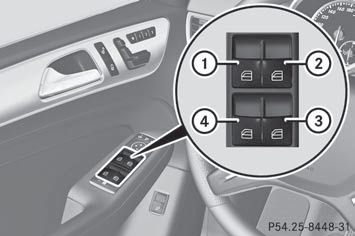
1 Front left
2 Front right
3 Rear right
4 Rear left
The switches for all side windows are located on the driver's door. There is also a switch on each door for the corresponding side window.
The switches on the driver's door take precedence.
 The side windows cannot be
operated
from the rear when the override feature for
the side windows is activated.
The side windows cannot be
operated
from the rear when the override feature for
the side windows is activated.
- Turn the SmartKey to position 1 or 2 in the
ignition lock.
- To open: press the corresponding switch.
- To close: pull the corresponding switch.
If you press the switch beyond
the point
of resistance, an automatic opening/closing process is started in the
corresponding direction. You can stop
automatic operation by operating the
switch again.
You can continue to operate the
side
windows after you switch off the engine or
remove the SmartKey. This function is
available for up to five minutes or until the
driver's or front-passenger door is opened.
See also:
Important safety notes
A license agreement must exist in order
to activate the mbrace service. Ensure that
your system is activated and ready for use,
and press the
MB Info call button to
register. If any o ...
General information
The electric parking brake performs a
function test at regular intervals while the
engine is switched off. The sounds that can
be heard while this is occurring are normal.
WARNING
When l ...
Activating/deactivating the MONO function
This function is only available in vehicles for Canada.
You can use the MONO function to adopt the temperature and air distribution settings
on the driver's side for the front-passenger side.
...