
Door control panel
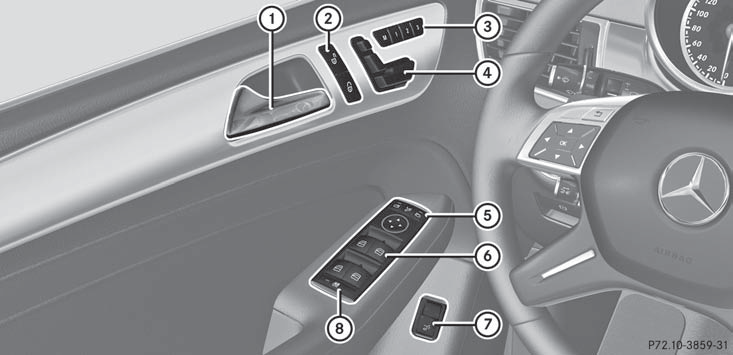
1 Opens the door
2  Unlocks/locks
the vehicle
Unlocks/locks
the vehicle
3  Stores settings for the seat,
exterior mirrors and
steering wheel
Stores settings for the seat,
exterior mirrors and
steering wheel
4 Adjusts the seat electrically
5  Adjusts and folds the
exterior mirrors in/out
electrically
Adjusts and folds the
exterior mirrors in/out
electrically
6  Opens/closes the
side windows
Opens/closes the
side windows
7  Opens/closes the
tailgate
Opens/closes the
tailgate
8  Activates/deactivates the
override
feature for the side
windows in the rear
compartment
Activates/deactivates the
override
feature for the side
windows in the rear
compartment
See also:
Installing the towing eye
Remove the towing eye from the vehicle
tool kit.
WARNING
The exhaust tail pipe may be hot. You could
burn yourself if you touch the tail pipe. Be
particularly careful when removing the rear ...
Engines: new CDI-four-cylinder units with a fuel consumption of just 5.3
litres and 139 grams of CO2 per kilometre
With three completely newly developed four-cylinder engines, the
Mercedes-Benz E-Class also remains one generation ahead where diesel technology
is concerned. These engines feature latest-generati ...
Proper use
WARNING
There are various warning stickers affixed to
your vehicle. Their purpose is to alert you and
others to various dangers. Therefore, do not
remove any warning stickers unless the
stic ...