
Cruise control lever
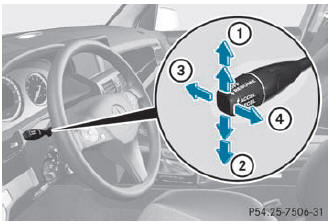
- To switch on or to increase the speed
- To switch on or to reduce the speed
- To deactivate cruise control
- To switch on with the current speed or with the last stored speed
When you activate cruise control, the stored speed is shown in the multifunction display for five seconds. In the multifunction display, the segments between the stored speed and the maximum speed light up.
See also:
Deactivating the HOLD function
The HOLD function is deactivated
automatically if:
- you accelerate and the transmission is in position D or R.
- the transmission is in position P.
- you apply the brakes again with a certain am ...
Safety
Standard features include antilock brakes, side-impact airbags for the front
seats, side curtain airbags, an electronic stability system and active front
head restraints. ...
Towing a vehicle with both axles on
the ground
When having your vehicle towed, observe the
important safety notes.
WARNING
The power assistance for the steering and the
brake force booster do not work when the
engine is not running. You w ...