
Locking the vehicle (mechanical key)
If the vehicle can no longer be locked with the SmartKey, use the mechanical key.
- Open the driver's door.
- Close the front-passenger door, the rear doors and the tailgate.
- Press the locking button ().
- Check whether the locking knobs on the front-passenger door and the rear doors are still visible. Press down the locking knobs by hand, if necessary.
- Close the driver's door.
- Take the mechanical key out of the SmartKey ().
- Insert the mechanical key into the lock of the driver's door as far as it will go.
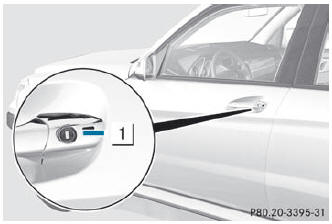
- Turn the mechanical key clockwise as far as it will go to position 1.
- Turn the mechanical key back and remove it.
- Make sure that the doors and the tailgate are locked.
- Insert the mechanical key into the SmartKey.
 If you lock the vehicle as described above, the fuel filler flap is not locked.
The antitheft alarm system is not armed.
If you lock the vehicle as described above, the fuel filler flap is not locked.
The antitheft alarm system is not armed.
See also:
Activating the rear view camera
Make sure that the SmartKey is
in position 2 in the ignition lock.
Make sure that the "rear view
camera" function is selected in COMAND (see the separate operating instructions
for ...
Problems with the seat ventilation
The seat ventilation has switched off
prematurely or cannot be switched on. The
vehicle's electrical system voltage is too low
because too many electrical consumers are
switched on.
•► ...
Changing the settings of the locking system
You can change the setting of the locking system in such a way that only the
driver's door and the fuel filler flap are unlocked. This is useful if you frequently
travel on your own.
To ch ...