
Multifunction steering wheel
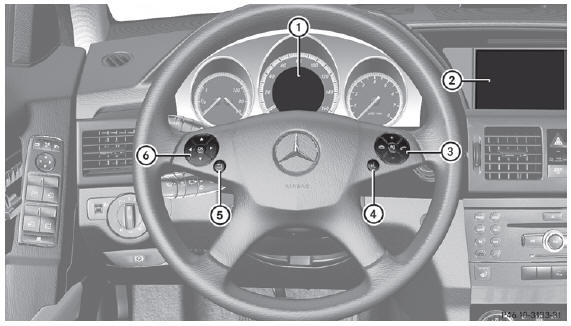
- Multifunction display
- Audio system/ see the separate instructions
 Rejects or ends Exits phone
book/ memory
Rejects or ends Exits phone
book/ memory
 Makes or accepts Switches to the
memory
Makes or accepts Switches to the
memory
 Adjusts the volume
 Mute
Mute Switches on the Voice Control
System; see the separate operating instructions
Switches on the Voice Control
System; see the separate operating instructions Back or deactivates the Voice
Control System
Back or deactivates the Voice
Control System Selects a menu
 Selects the submenu or scrolls through
lists
Selects the submenu or scrolls through
lists
 Confirms selections and hides display
messages
Confirms selections and hides display
messages
See also:
Useful information
This Operator's Manual describes
all
models and all standard and optional
equipment of your vehicle available at the
time of publication of the Operator's
Manual. Country-specific differenc ...
Cleaning the exterior lighting
► Clean the plastic lenses of the
exterior
lights with a wet sponge and a mild cleaning
agent, e.g. Mercedes-Benz car shampoo or
cleaning cloths.
Only use cleaning agents or cleaning
cl ...
Cleaning the seat belts
– Use clean, lukewarm water and soap
solution.
Do not clean the seat belts using chemical
cleaning agents. Do not dry the seat belts
by warming them above 176 °F (80 °C) or
placing them ...