
AMG displays
 Press
Press  or
or
 on the steering wheel
to select the AMG menu.
on the steering wheel
to select the AMG menu.
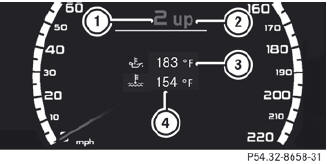
1 Gear indicator
2 Upshift indicator
3 Engine oil temperature
4 Coolant temperature
Upshift indicator UP 2 indicates that the engine has reached the overrevving range when in the manual gearshift program.
Upshift indicator UP 2 fades out other messages until you have shifted up.
When the engine oil temperature is below 80 °C, the oil temperature is shown in blue.
Avoid driving at full engine output during this time.
 S 63 AMG: additionally, the status of the
ECO start/stop function will
be displayed.
S 63 AMG: additionally, the status of the
ECO start/stop function will
be displayed.
See also:
Safety guidelines for seat belts, Emergency Tensioning Devices (ETDs) and air
bags
WARNING
Damaged seat belts or seat belts that have been subjected to stress in
an accident must be replaced. Their anchoring points must also be checked. Only
use seat belts installed o ...
Storing settings
With the memory function, you can store up
to three different settings, e.g. for three
different people.
The following settings are stored as a single
memory preset:
- position of the se ...
Towing the vehicle with the rear axle
raised
Only possible on vehicles without
4MATIC.
When towing your vehicle with the rear axle
raised, it is important that you observe the
safety instructions
The ignition must be switched off if you ...