
Route guidance inactive
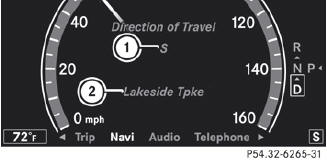
1 Direction of travel
2 Current road
See also:
Safety guidelines for seat belts,
Emergency Tensioning Devices (ETDs)
and air bags
WARNING
- Damaged seat belts or seat belts that have
been subjected to stress in an accident
must be replaced. Their anchoring points
must also be checked. Only use seat belts
installed o ...
Jump-starting
WARNING
Failure to follow these directions will cause damage to the electronic components,
and can lead to a battery explosion and severe injury or death.
Never lean over batteries while connectin ...
Snow chains
For safety reasons, Mercedes-Benz
recommends that you only use snow chains
which have been specially approved for your
vehicle by Mercedes-Benz, or are of a
corresponding standard of quality.
...