
Operating the on-board computer
The on-board computer is activated as soon as you turn the SmartKey to position 2 in the ignition lock.
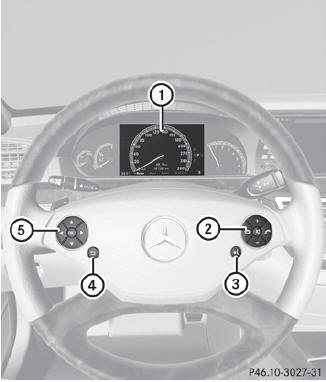
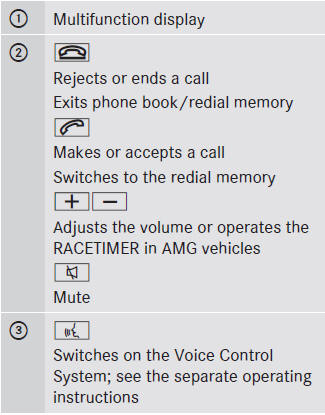
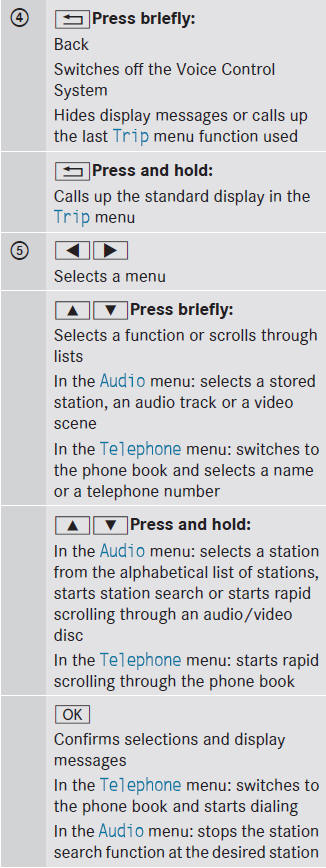
You can control the multifunction display and the settings in the on-board computer using the buttons on the multifunction steering wheel.
See also:
Qualified specialist workshop
An authorized Mercedes-Benz Center is a qualified specialist workshop. It has
the necessary specialist knowledge, tools and qualifications to correctly carry
out the work required on your vehicle. ...
More power, lower consumption: the engines
An improvement of up to 31 per cent has been achieved in fuel consumption and
all Mercedes-Benz C-Class launch models will feature the ECO start/stop function
as standard. All the engine variants ...
Rear seat head restraints
WARNING
For safety reasons, always drive with the rear
head restraints in the upright position when
the rear seats are occupied.
Keep the area around head restraints clear of
articles ...