
Cruise control lever
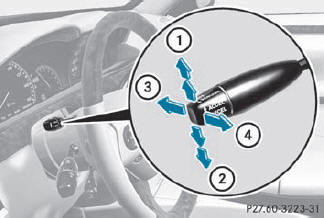
1 To switch on or to increase the speed
2 To switch on or to reduce the speed
3 To deactivate cruise control
4 To switch on with the current speed or
with the last stored speed
When you activate cruise control, the stored speed is shown in the multifunction display for five seconds and is indicated in the speedometer by a triangle. The speedometer dial lights up between the set speed and the maximum speed.
See also:
High-beam flasher
To switch on: turn the SmartKey in the
ignition lock to position 1 or 2 or start the
engine.
Pull the combination switch in the direction
of arrow 3. ...
Problems with the rear window defroster
The rear window defroster has deactivated
itself prematurely or cannot be activated.
Switch off any consumers that
are not
required, e.g. reading lamps or interior
lighting.
When the batter ...
Functions of the number keypad
You can use the remote control to execute the same functions as the COMAND
control panel.
Mode
Function
Audio mode
Selects stations via the station presets
Sets stations ...