
Setting the airflow
You can set the airflow separately for the driver’s and front-passenger side.
 Select left airflow 3 or right airflow 5 by
turning
Select left airflow 3 or right airflow 5 by
turning  the COMAND controller and
press
the COMAND controller and
press  to confirm.
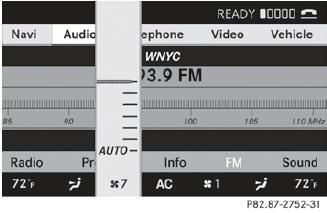
To adjust the airflow: slide
 or turn
the COMAND controller.
or turn
the COMAND controller.
To confirm the selection: press
the
COMAND controller.
See also:
Body: high energy absorption in the event of a front impact
The extremely robust occupant compartment of the Mercedes-Benz M-Class,
together with the front and rear deformation zones, forms an effective basis for
the occupant protection system. The focus o ...
Switching Adaptive Highbeam Assist
on/off
Press the or
button on the
steering wheel to select the Settings
menu.
Press the or
button to select
Adapt. High-beam Asst..
Press the button to confirm.
To activate/deactivate: p ...
NECK-PRO luxury head restraints
If you have difficulty resetting
the NECK-PRO
luxury head restraints, have this work
carried out at a qualified specialist
workshop, e.g. an authorized Mercedes-
Benz Center.
Remove res ...