
Hiding/showing the navigation menu
 To show: turn
 or slide
 the
COMAND controller.
the
COMAND controller.
 This function is not available while the
DVD's own menu is being
displayed.
This function is not available while the
DVD's own menu is being
displayed.
To hide: slide the
COMAND
controller.
or
Wait for approximately eight seconds.
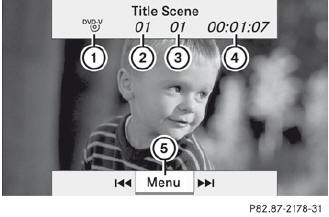
Navigation menu displayed
1 Data medium type
2 Current track
3 Current scene
4 Track time
5 To show the menu
See also:
Problems with the navigation system
Problem
Possible causes/consequences and
Solutions
COMAND is unable to
continue route
guidance after the
journey has been
interrupted.
Route guidance is canc ...
Setting a speed
WARNING
Keep in mind that it may take a brief moment
until the vehicle has made the necessary
adjustments.
Increase or decrease the set vehicle speed to
a value that the prevailing road cond ...
Making adjustments in 1 mph (Canada: 1 km/h) increments
Briefly press the cruise control lever to the pressure point, up 1 for a higher
speed or down 2 for a lower speed. The last speed stored is increased or reduced. ...