
HD Radio display
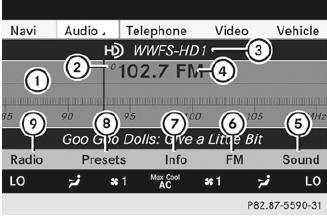
HD Radio display
1 Display/selection window with frequency display
2 Preset number
3 Name of the selected station with HD icon and program number
4 Station frequency
5 Sound settings
6 FM, AM or WB radio
7 Program information
8 Station presets
9 Radio functions
See also:
Switching the rear window wiper on/off
Combination switch
1 Switch
2 To wipe with washer fluid
3 To switch on intermittent wiping
4 0 To switch off intermittent wiping
5 To wipe with washer fluid
► Turn the SmartKey to po ...
Calling up a stored parking position setting
Turn the SmartKey to position 2 in the ignition lock.
Adjust the exterior mirror on the frontpassenger side with the corresponding
button ().
Engage reverse gear. The exterior mirror on the ...
Defrosting the windows
Windows fogged up on the inside
► Activate the cooling with air
dehumidification function .
► Activate automatic mode
.
► If the windows continue to fog up,
activate
the defr ...