
CD/DVD drive and AUX jacks
The CD/DVD drive is located in the center behind the front seats.
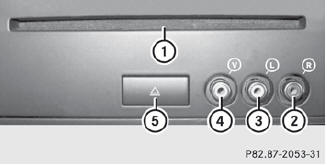
1 CD/DVD slot
2 AUX, right-hand (R) jack for audio signal
3 AUX, left-hand (L) jack for audio signal
4 AUX, jack for video signal (V)
5 CD/DVD eject button
The AUX jacks shown are for the AUX drive.
Identical jacks can be found on the right-hand side of the rear-compartment screens (AUX display).
See also:
Radiator
Vehicles with a diesel engine: do not
cover the radiator, for example with a
winter front or bug cover. The readings of
the on-board-diagnostic system may
otherwise be inaccurate. Some of ...
Opening
Press the
button on the SmartKey.
Pull handle 1.
Raise the trunk lid. ...
Safety notes
WARNING
For safety reasons, only enter a destination
when the vehicle is stationary. When the
vehicle is in motion, a passenger should enter
the destination. Study manual and select
route b ...