
Storing settings
With the memory function, you can store up to three different settings, e.g. for three different people.
The following settings are stored as a single memory preset:
• seat, backrest, head restraint position and contour of the backrest in the
lumbar region
• active multicontour seat: activated/deactivated
• multicontour seat: the side bolsters of the seat cushion and the backrest as
well as the contour of the backrest in the lumbar and shoulder regions
• driver's side: steering wheel position
• driver's side: position of the exterior mirrors on the driver's and
front-passenger sides
WARNING
Do not activate the memory function while
driving. Activating the memory function while
driving could cause the driver to lose control
of the vehicle.
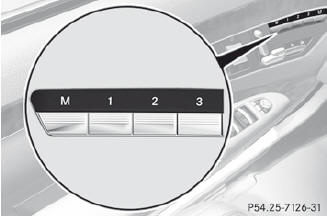
 Adjust the seat.
On the driver's side, adjust the steering
wheel and the exterior mirrors.
Press memory button M and then press
storage position button 1, 2 or 3 within
three seconds until you hear an
acknowledgment tone.
The settings are stored in the selected
storage position.
See also:
Adjusting the seats electrically
1 Head restraint height
2 Seat cushion angle
3 Seat height
4 Seat fore-and-aft adjustment
5 Backrest angle
Vehicles with memory function:
if PRE-SAFE
® has been triggered, the frontpasse ...
Through-loading facility in the rear
compartment
WARNING
Do not transport any unsecured items in the
through-loading area.
The through-loading facility is opened from
the cargo compartment.
– Unlatch the rear seat backrests and tilt
th ...
Centrally locking and unlocking the vehicle from the inside
You can centrally lock or unlock the vehicle
from the inside.
The central locking/unlocking button does
not lock or unlock the fuel filler flap.
You cannot unlock the vehicle
centrally
from ...