
Opening
 Press the
  button on the
SmartKey.
button on the
SmartKey.
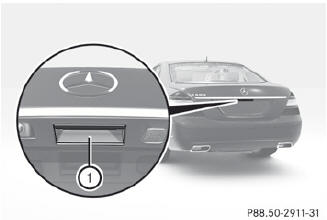
Pull handle 1.
Raise the trunk lid.
See also:
Stowage compartments in the front
Glove box
The glove box can be cooled.
– To open: pull handle 1 and open glove box
flap 2.
– To close: fold glove box flap 2 upwards
until it engages.
The glove box can only be locked ...
Additives
Only use DEF in accordance with ISO
22241. Do not use additives with DEF and
do not dilute DEF with water. This may
destroy the BlueTEC exhaust gas
aftertreatment system. ...
BAS (Brake Assist System)
Observe the "Important safety
notes"
section.
BAS operates in emergency braking
situations. If you depress the brake pedal
quickly, BAS automatically boosts the braking
force, th ...