
Fuse box in the trunk
•► Open the trunk lid
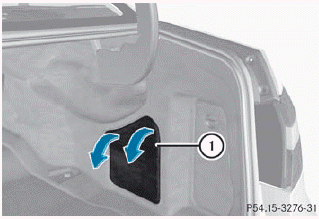
•► To open: release cover 1 at the top right and left-hand sides with a flat object.
•► Open cover 1 downwards in the direction of the arrow.
See also:
Important safety notes
WARNING
Make sure the trunk lid is closed when the
engine is running and while driving. Among
other dangers, deadly carbon monoxide (CO)
gases may enter the vehicle interior resulting
in un ...
4MATIC: high-performance all-wheel-drive system with sophisticated control
systems
The 4MATIC powertrain at the heart of the Mercedes-Benz GLK-Class is one of
the most capable all-wheel-drive systems on the market. The driving dynamics
systems ESP®, ASR and 4ETS are superbly har ...
Important safety notes
WARNING
Gasoline and diesel fuels are highly flammable
and poisonous. They burn violently and can
cause serious injury.
Never allow sparks, flames or smoking
materials near gasoline or die ...