
Introduction
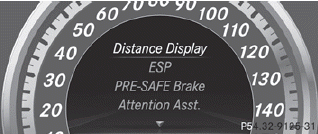
In the DriveAssist. menu you can:
- show the distance display
- activate/deactivate ESP®
- activate/deactivate PRE-SAFE® Brake
- activate/deactivate ATTENTION ASSIST
- activate/deactivate Blind Spot Assist or
Active Blind Spot Assist
- activate/deactivate Lane Keeping Assist or
Active Lane Keeping Assist
See also:
Your Den, On Wheels
The S-Class' cabin mixes classic luxury cues with modern technology features.
It also includes the kind of details you'd expect in this segment, like a
leather instrument panel cover and classy ch ...
Tires
WARNING
Do not drive with a flat tire. A flat tire affects the ability to steer or brake
the vehicle. You may lose control of the vehicle. Continued driving with a flat
tire will cause exces ...
Maximum load rating
WARNING
Do not overload the tires by exceeding the specified load limit as indicated
on the Tire and Loading Information placard on the driver's door B-pillar. Overloading
the tires can ...