
Route guidance active
No change of direction announced
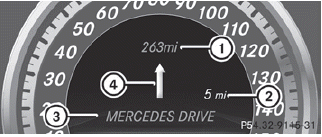
1. Distance to the destination
2. Distance to the next change of direction
3. Current road
4. Symbol for "follow the road's course"
See also:
Operation
Depending on the date of manufacture of your vehicle, the
or
symbol for the automatic headlamp mode/daytime
running lamps is located on the light switch.
Illustration: light switch with the
...
Cruise control lever
1. To store the current speed or a higher
speed
2. To store the current speed or a lower
speed
3. To deactivate DISTRONIC PLUS
4. To store the current speed or to call up
the last ...
Overview of transmission positions
Selector lever
P Park position with selector lever lock
R Reverse gear
N Neutral
D Drive ...