
Route guidance inactive
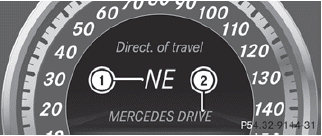
1. Direction of travel
2. Current road
See also:
Important safety notes
For BlueTEC vehicles only.
DEF is a non-flammable, non-toxic, colorless,
odorless and water-soluble fluid.
Rinse surfaces that have come into
contact with DEF immediately with water or
remov ...
Automatic drive program
Drive program E (drive program C on AMG
vehicles) is characterized by the following:
- the vehicle pulling away more gently in
forward and reverse gears, unless the
accelerator pedal is d ...
Tire ply composition and material used
Describes the number of plies or the number
of layers of rubber-coated fabric in the tire
tread and sidewall. These are made of steel,
nylon, polyester and other materials. ...