
Menu overview
The number of menus shown depends on the optional equipment in the vehicle.
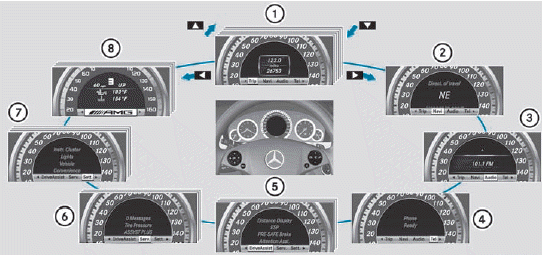
1. Trip menu
2. Navi menu (navigation instructions)
3. Audio menu
4. Tel menu (telephone)
5. DriveAssist. menu (assistance)
6. Serv. menu
- calls up display messages
- tire pressure loss warning system (Canada only)
- tire pressure monitor
- ASSYST PLUS service interval display
7. Sett. menu
8. AMG menu in AMG vehicles
See also:
Unlocking and opening doors from inside
You can open a door from inside the vehicle
even if it has been locked. You can only open
the rear doors from inside the vehicle if they
are not secured by the child-proof locks.
Only open th ...
Calling up a stored parking position setting
Turn the SmartKey to position
2 in the
ignition lock.
Adjust the exterior mirror on the
frontpassenger
side with the corresponding
button.
Engage reverse gear.
The exterior mirror on t ...
Important safety notes
WARNING
Inhalation of exhaust gas is hazardous to your
health. All exhaust gas contains carbon
monoxide (CO), and inhaling it can cause
unconsciousness and possible death.
Do not run the e ...