
Overview
The on-board computer is activated as soon as you turn the SmartKey to position 1 in the ignition lock.
You can control the multifunction display and the settings in the on-board computer using the buttons on the multifunction steering wheel.
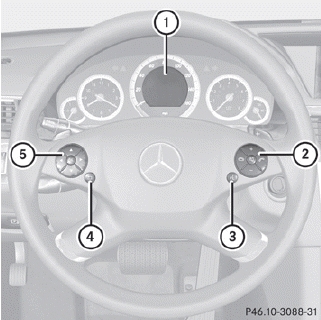
1. Multifunction display
2. Right control panel
3. To switch on the Voice Control System;
see the separate operating instructions
4. Back button
5. Left control panel
See also:
Generous: the interior dimensions and load capacity
The Mercedes-Benz C-Class is amongst the most spacious vehicles in its
segment. The front shoulder room and the elbow width amount to 1390 and 1440
millimetres respectively. In the rear, the saloo ...
Important safety notes
WARNING
To help avoid personal injury during a collision
or sudden maneuver, exercise care when
storing objects in the vehicle. Put luggage or
cargo in the cargo compartment if possible.
Do n ...
Important safety notes
WARNING
Do not adjust the steering wheel while driving. Adjusting the steering wheel
while driving, or driving without the steering wheel adjustment feature locked could
cause the driver to ...