
Engaging parking position P in AMG vehicles
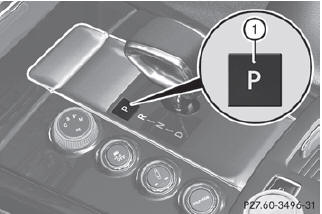
•► If the vehicle is stationary, press P button 1.
See also:
General notes
USA only:
This device complies with Part 15 of the
FCC Rules. Operation is subject to the
following two conditions:
1. This device may not cause harmful interference, and
2. this device must a ...
Driving systems
Display messages
Possible causes/consequences and
Solutions
Based on specific criteria, ATTENTION ASSIST has determined that the
driver is tired or paying less attentio ...
Lap of Luxury
As in the S-Class, the cabin is a highlight of the CL-Class, with
exceptional-quality materials and perhaps the best-executed ambient lighting in
the market, with a line of yellow-orange LEDs that ...