
Setting the center air vents
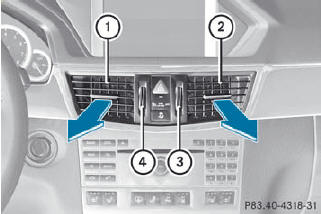
1. Center air vent, left
2. Center air vent, right
3. Center vent thumbwheel, right
4. Center vent thumbwheel, left
•► To open/close: turn thumbwheels 3 and 4 up or down.
See also:
Operating video DVD
– Switch on COMAND and select video DVD
(see the separate operating instructions).
– Press the or
button on the
steering wheel to select the Audio menu.
DVD changer display (example)
1 Cur ...
Warning and indicator lamps
...
Gasoline
Fuel grade
You should only refuel with unleaded
premium-grade gasoline as this avoids
damaging the catalytic converter.
If engine running problems are apparent,
have the cause checked immediat ...