
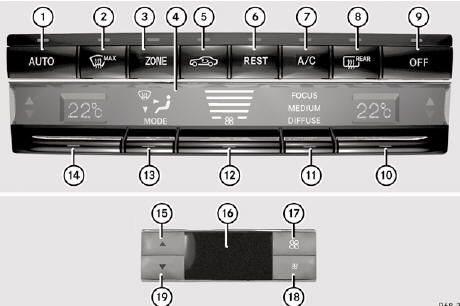
Control panel for 3-zone automatic climate control
Canada only
Front control panel
1. To set climate control to automatic
2. To defrost the windshield
3. To switch the ZONE function on/off
4. Display
5. To activate/deactivate air-recirculation mode
6. To activate/deactivate the residual heat function
7. To activate/deactivate cooling with air dehumidification
8. To switch the rear window defroster on/off
9. To switch climate control on/off
10. To set the temperature, right
11. To set climate control to automatic (FOCUS/MEDIUM/DIFFUSE)
12. To set the airflow
13. To set the air distribution
14. To set the temperature, left
Rear control panel
15. To increase the temperature
16. Display
17. To increase the airflow
18. To reduce the airflow
19. To reduce the temperature
See also:
Stylish cockpit with three round dials and two colour displays
In addition to the "wrap-around effect" of the instrument panel support, the
newly-designed multifunction steering wheel in the 3-spoke design in Nappa
leather is particularly eye-catchi ...
On-board diagnostics interface
WARNING
If you connect equipment to the on-board
diagnostics interface, it can affect the
operation of the vehicle systems. This can
impair the operating safety of your vehicle
while drivin ...
Rear seat head restraints
WARNING
For safety reasons, always drive with the rear
head restraints in the upright position when
the rear seats are occupied.
Keep the area around head restraints clear of
articles (e.g. c ...