
Adjusting the active multicontour seat
The active multicontour seat on the driver's side automatically adapts the sides of the backrest to your current driving style. You can adjust the contour of the seats individually so as to provide optimum support for your back and sides.
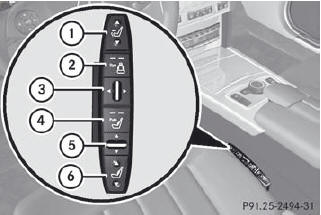
1. To adjust the seat cushion length
2. To switch the dynamic function on or off
3. To adjust the side bolsters of the seat
backrest
4. To switch the massage function on or off
5. To adjust the contour of the backrest to
increase/decrease support
6. To adjust the height/depth of the
backrest contour
See also:
Please bear the following in mind
Resetting the service interval display A qualified specialist workshop, e.g.
an authorized Mercedes-Benz Center, will reset the service interval display after
the necessary service work has been c ...
Change of address or change of ownership
In the event of a change of address, please send us the "Change of Address Notice"
found in the Service and Warranty Information Booklet, or simply call the Mercedes-Benz
Customer Assist ...
Standard display
Press and hold the button on the
steering wheel until the Trip menu with odometer 1 and trip odometer 2 is shown. ...