
Opening and closing
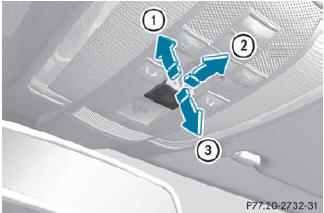
Overhead control panel
1. To open
2. To open
3. To close
•► Turn the SmartKey to position 1 or 2 in the ignition lock.
•► Press or pull the  switch in the
corresponding direction.
switch in the
corresponding direction.
If you press the switch beyond
the
point of resistance, an automatic opening/
closing process is started in the
corresponding direction. You can stop
automatic operation by operating the
switch again.
See also:
Replacing the wiper blades
Moving the wiper blades to a vertical
position
Vehicles without KEYLESS-GO
Turn the SmartKey to position 1 or 2 in the
ignition lock.
Set the windshield wipers to
position .
When the wipe ...
Problems with the seat ventilation
The seat ventilation has switched off
prematurely or cannot be switched on. The
vehicle's electrical system voltage is too low
because too many electrical consumers are
switched on.
- Switch ...
Determining the correct load limit
Step-by-step instructions
The following steps have been developed as
required of all manufacturers under Title 49,
Code of U.S. Federal Regulations, Part 575
pursuant to the "National Traf ...